Qibla Compass: Al Quran
- 4.4
- Rating
- 1.00M
- Installs
- Free
- Price
 Analysis by App-foxy
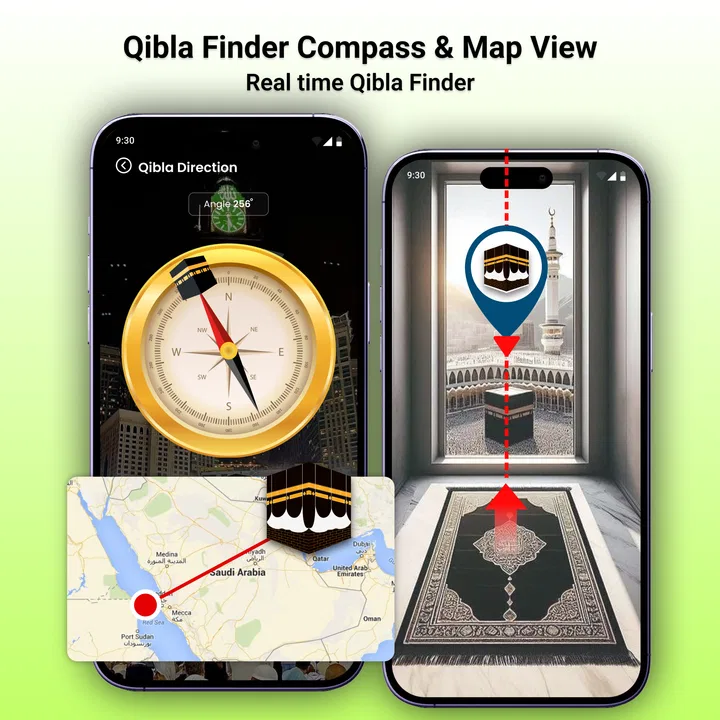
Finding the Qibla sounds simple until I am in an unfamiliar room, travelling through a new city, or standing outside without a mosque nearby. That is where Qibla Compass: Al Quran tries to help. It is a free Android app from Radiant Islamic Apps, listed in the Libraries & Demo category, and its main purpose is to point me toward the direction of the Kaaba with a phone-based compass and location support.
I approached it as a practical decision rather than a novelty: is it easier and more dependable than checking a map, estimating from the sun, or looking for a separate compass tool? My answer is mostly yes, provided I treat the displayed direction as guidance and set up the phone carefully. The app is useful for everyday prayer planning, but its effectiveness depends heavily on the phone’s sensors, the surroundings, and the way I hold the device.
What I look for before trusting a Qibla app
The first thing I consider is whether the app reduces uncertainty without creating a new problem. A Qibla tool should make the direction easy to understand, start quickly, and remain practical when I am away from familiar landmarks. I also want to know whether it suits a regular user who needs a quick answer or a traveller who may be dealing with poor orientation, unfamiliar buildings, and changing locations.
You May Also Like

 Pandora - Music & Podcasts
Pandora’s Music Is Easy to Start, but Harder to Recover
Pandora’s strength is its low-effort path from a seed to a station. Its weak spot is how much confidence it asks you to place in connection, setup, and quiet recovery.

 AccuWeather: Weather Radar
AccuWeather Review: A Quick, Clear Forecast for Everyday Decisions
For everyday plans, the best forecast is the one you can understand quickly. AccuWeather makes rain timing, radar, and local conditions easy to act on, with a few trade-offs.

 Hill Climb Racing
Why Hill Climb Racing Still Turns Crashes Into One More Run
A tiny car, a bumpy hill and one more upgrade: Hill Climb Racing keeps resurfacing because its simple chaos makes every near-miss feel personal.

 AliExpress - Shopping App
AliExpress Makes Global Shopping Feel Personal, but Shoppers Bear the Risk
AliExpress turns a global marketplace into a pocket-sized discovery engine. Its reach is useful, its shopping loop compelling, and its trade-offs easy to miss.

 Lords Mobile: Kingdom Wars
Lords Mobile Is a Kingdom-Building Routine, Not a Quick Match
A case-by-case verdict on the building, battles, device demands, and social commitments that make Lords Mobile rewarding for some players and exhausting for others.

 PDF Scanner app - TapScanner
TapScanner Makes Paperwork Easier to Capture, Check, and Share
TapScanner makes scanning with a phone feel less like a rescue operation and more like a dependable step in getting work done. Its capture tools are useful, though not flawless.
More From Our News Desk
View All News


For this app, the decision begins with its combination of GPS and compass guidance. That is more useful than a fixed arrow that assumes I am always in one place. When I move from home to a hotel, workplace, airport, or outdoor location, location-based direction can adapt to where I am. The important trade-off is that a phone compass is not automatically accurate simply because an app presents a clear needle.
I also pay attention to how much effort is involved before the first useful result. A good workflow is to allow location access when needed, hold the phone flat, and move away from magnetic objects. Car interiors, metal tables, speakers, charging accessories, and some phone cases can interfere with the sensor. If the arrow behaves strangely, I do not immediately blame the app; I first change position and recalibrate the phone in a clear area.
Another decision point is whether I need a complete religious reference app or only a directional tool. Qibla Compass: Al Quran is best understood as a focused utility inside the wider religious-app space. Someone looking mainly for prayer times, a Quran reader, translations, or a broad collection of daily resources may prefer a more comprehensive app. Someone who wants a straightforward Qibla aid may appreciate the narrower purpose.
The app has a 4.3 average from around 3.1 thousand ratings, with over 1 million installs. Those figures suggest that it has reached a substantial audience, but they do not remove the need for sensible use. A compass reading should be checked when the setting is important, especially in a new building or in a place where the phone’s sensors are behaving inconsistently.
My first practical test: a familiar room
I find the best way to judge a Qibla app is not to open it for the first time during a rushed prayer. I start in a familiar room where I already have a reasonable idea of the direction. This gives me a reference point and lets me notice whether the phone reacts smoothly when I turn.
In that situation, the app’s value is immediate. Instead of opening a general map, searching for the Kaaba, measuring a line, and mentally converting that line into a direction, I can use a purpose-built compass view. That removes several steps. It also makes the tool easier for a family member or guest who does not want to interpret a map interface.
There is a useful habit here that is easy to overlook: I check the direction while standing still, then rotate my body and phone together. Turning only the phone while keeping my body fixed can produce a different practical experience from turning naturally toward the indicated direction. Once I understand how the compass responds, I can place a small prayer space with more confidence rather than repeatedly reopening the app.
Where the app is especially convenient
The strongest part of Qibla Compass: Al Quran is its directness. Its store summary presents it as a smart Qibla finder using GPS and a compass, and that describes the central experience without requiring me to translate a general-purpose navigation screen into a prayer direction. The app is free to download, which makes it easy to try before deciding whether it belongs in my regular toolkit.
I find this particularly useful when arriving somewhere unfamiliar. Imagine checking into a hotel after a long journey. The room may not have an obvious orientation, the windows may face an internal courtyard, and the nearest mosque may not be close enough to use as a reference. Opening a dedicated Qibla tool is faster than studying the building layout or searching online for a nearby landmark.
It is also helpful in temporary spaces. A rented apartment, a university room, a hospital waiting area, or a friend’s home may not have a marked prayer direction. The phone can provide an initial bearing without requiring furniture to be moved or a permanent marker placed on the wall. I would still verify the result if possible, but the app gives me a practical starting point.
Outdoor use is another sensible scenario. In a park, at a campsite, or during a long-distance trip, fixed room orientation is irrelevant. A GPS-assisted compass is more appropriate than relying on the direction of a building. The phone does not need a visible landmark that points toward the Kaaba; it can provide a bearing based on the current location and the device’s orientation.
The most important practical tip is to treat calibration and positioning as part of using the app, not as optional extras. I keep the phone level, avoid placing it beside metal, and give the compass a moment to settle. If the arrow jumps, I move away from the source of interference before making a decision. This habit improves the usefulness of the app more than simply reopening it again and again.
Small details that make the workflow better
One non-obvious advantage of a focused compass tool is that it changes how I prepare. Rather than waiting until prayer time, I can check the direction when I first enter a new place. I then know where to stand later, even if the phone battery is low or the room becomes busy. This is a simple workflow, but it turns a last-minute search into a one-time orientation task.
A second useful approach is to compare the reading from two positions in the same room. I place myself away from large metal objects, note the indicated direction, then take a few steps to another clear spot. If the result changes dramatically, the environment or sensor needs attention. If it remains consistent, I have more reason to trust the reading as a working guide.
A third insight is that GPS and compass accuracy solve different parts of the problem. Location helps calculate the bearing from where I am to the Kaaba, while the compass helps the phone show which way I am facing. A strong location signal cannot correct a magnetically disturbed compass, and a stable compass cannot compensate for an incorrect or outdated position. Understanding that distinction prevents unrealistic expectations.
I also avoid using the app while the phone is attached to a magnetic car mount or placed directly on a metal surface. That is especially relevant for travellers, because a car is a convenient place to check directions but also a difficult environment for a magnetometer. I prefer to stop safely, remove the phone from the mount, and check it away from the vehicle rather than reading the arrow while moving.
What the developer and version tell me as a user
Radiant Islamic Apps presents this as a free app for everyone, and the current version is 1.7.5. It supports Android 7.0 and later, so it is accessible to people using older compatible Android phones as well as newer devices. That broad system support is useful for households where not every family member has a recent handset.
The app includes optional in-app purchases ranging from $2.99 to $14.99 per item. I would therefore install it with the expectation that the basic download is free while some parts of the experience may offer paid items. This does not automatically make the app poor value, but it is worth noticing if I am choosing a tool specifically because I want a completely no-cost experience.
The age classification is Everyone, which fits a directional utility intended for general use. I can imagine it being useful for an individual, a family, or a visitor in a shared space without needing a complicated setup. The simple purpose also makes it easier to explain to someone who is not comfortable with navigation apps.
When another kind of tool may be a better fit
Qibla Compass: Al Quran is not automatically the best choice for every user. If I want a full Islamic companion with Quran reading, prayer schedules, reminders, and broader daily resources, a larger religious app may reduce the number of separate tools on my phone. That kind of alternative may be more convenient for someone who wants one central dashboard rather than a dedicated compass.
On the other hand, a general map can be preferable when I need context around the direction. Maps are better for seeing roads, buildings, nearby mosques, and the relationship between several locations. They can help me understand where I am in a city, while this app is more focused on answering the narrower question of which way to face.
A physical compass may suit someone who spends time outdoors, travels where phone power is unreliable, or prefers a tool that does not depend on a screen. It requires learning how to use it and still needs a known bearing or method for determining the Qibla, so it is not automatically simpler. Its advantage is independence from the phone’s battery and software.
Some users may also prefer a mosque, local prayer space, or trusted printed guide when one is readily available. A visible established prayer direction can be reassuring, especially in a building where the phone’s compass is affected by steel structures. In that situation, the app works better as a confirmation tool than as the only source of guidance.
The biggest limitation is not unique to this application: phone compasses can be disturbed. A visually confident arrow can still be wrong if the handset is near magnetic material or has not settled. I would not use the app carelessly in a crowded technical environment and assume that a precise-looking display guarantees precision. The sensible response is to cross-check and recalibrate.
There is also a learning curve for first-time users. Someone may open the app, see the direction, and immediately walk or turn without understanding how the phone’s orientation is being measured. A few seconds spent holding the device flat and observing the movement can prevent confusion. The app is simple in purpose, but simple does not mean entirely automatic.
The cost of changing from a usual alternative
If I currently use a map, switching to this app is inexpensive in terms of effort because the purpose is narrower. I no longer need to search for the Kaaba manually or interpret a long route screen. The adjustment is mainly learning to trust the compass procedure: stand clear, hold the phone properly, and check whether the reading is stable.
If I already rely on a complete religious app, the switch may not be worthwhile as a replacement. This tool may complement that app rather than remove it. The decision depends on whether I value a dedicated Qibla screen enough to keep another app installed. For occasional use, a broader app may be adequate; for frequent travel or repeated checks in unfamiliar places, the focused workflow can justify the extra space.
The financial side is straightforward at the starting point because the app is free. Still, I would review any optional purchase screen before confirming anything, particularly if I am installing it for a child or on a shared device. The presence of paid items means that “free to install” and “every part is free” should not be treated as identical claims.
Switching also has a practical cost in attention. I need to remember that the app gives a direction, not a physical marker in the room. After checking it, I may still want to align a prayer mat or choose a clear place to stand. That extra step is small, but it is part of using a digital compass responsibly.
Who should install it, and who should skip it?
I would recommend trying it if I were advising a traveller, a student moving between rooms, or someone who regularly prays in unfamiliar places. It is also a sensible choice for a household that wants a dedicated Qibla reference without paying at the point of installation. The Android compatibility down to version 7.0 makes it practical for older devices that may not handle newer apps comfortably.
I would be more cautious about recommending it as the only solution for someone whose phone compass is already unreliable. If the device frequently shows unstable orientation in other navigation apps, this app cannot magically repair the underlying sensor. A physical reference, a known mosque direction, or another method of checking would be better alongside it.
I would also suggest skipping it if the main goal is a complete Quran and prayer-management experience. The app’s identity is centered on Qibla direction, so installing it with expectations of a broad collection of religious utilities could lead to disappointment. A wider alternative may be more efficient for users who want several functions in one place.
For older adults or relatives who dislike complicated interfaces, I would introduce it in a calm setting rather than during a rushed moment. I would show them how to hold the phone, how to recognize a stable reading, and why metal can affect the result. Once that routine is familiar, the focused purpose becomes an advantage instead of a barrier.
My recommendation after using it as a decision tool
Qibla Compass: Al Quran earns a place as a practical, focused aid. I like it because it addresses one specific need without forcing me to turn a general map into a compass exercise. Its GPS-and-compass approach is especially useful when I arrive somewhere new, while its free entry point makes testing it uncomplicated.
My recommendation comes with one clear condition: use it thoughtfully. Hold the phone level, check away from magnetic interference, compare readings when the surroundings are questionable, and prepare the direction before the moment becomes urgent. Those habits matter as much as the app itself.
For a traveller or anyone who regularly prays in changing locations, I think it is worth installing. For someone seeking a complete religious library, a general navigation map, or a battery-independent solution, another category may fit better. In my view, the app works best as a dependable everyday reference and a convenient backup to established local guidance, not as a reason to ignore common-sense verification.
Radiant Islamic Apps has kept the concept easy to understand: open a dedicated tool, orient the phone, and use the displayed bearing. That clarity is its main strength. The final choice is simple for me: choose this app when direct Qibla guidance matters more than having every religious feature in one package, and choose a broader alternative when your needs extend well beyond direction.
FAQs for Qibla Compass: Al Quran
01What features does Qibla Compass: Al Quran offer?
Qibla Compass: Al Quran provides a comprehensive set of features for Muslims, including an accurate Qibla direction finder, complete Quran text with translations, an Islamic calendar, prayer times, and nearby mosque locators. The app is user-friendly and designed to support users in their daily religious practices.
02How accurate is the Qibla direction feature?
The Qibla direction feature in Qibla Compass: Al Quran is highly accurate, utilizing GPS and magnetic sensors to provide precise direction to Mecca. It automatically adjusts based on your location, ensuring that you are always aligned correctly during prayers, no matter where you are in the world.
03Can I use the app offline?
Yes, Qibla Compass: Al Quran offers offline functionality for several features. You can access the Quran text and translations without an internet connection. However, for the most accurate Qibla direction and prayer times, it's recommended to connect to the internet periodically.
04Is Qibla Compass: Al Quran available for both Android and iOS?
Yes, Qibla Compass: Al Quran is available for download on both Android and iOS platforms. You can find it on the Google Play Store for Android devices and the Apple App Store for iOS devices, making it accessible to a wide range of users.
05Are there in-app purchases or ads?
Qibla Compass: Al Quran offers a free version with ads to support development. There are also in-app purchase options available to remove ads and unlock additional features. This allows users to customize their experience based on their preferences and needs.
Pros
- Accurate Qibla direction finder.
- Includes prayer time reminders.
- User-friendly interface.
- Supports multiple languages.
- Offline access to features.
Cons
- Ads can be intrusive at times.
- Limited customization options.
- Requires location access.
- Battery consumption is noticeable.
- No dark mode available.

Qibla Compass: Al Quran
Gallery